

Locations & Organization Settings
Your first organization
Section titled “Your first organization”During registration you’ll create your first organization as part of the onboarding process. This organization becomes the workspace where you’ll manage your business.
Once registration is complete, guided onboarding collects the first location, hours, and business details. You can still customize those settings later from this section.
Locations & Organization Settings define the foundation of your FullDay workspace. They determine how your business is represented, where services are delivered, and how bookings are scheduled across the platform.
This guide is intended for business owners and administrators responsible for configuring their organization’s operational setup.
What is an organization?
Section titled “What is an organization?”An organization represents your business within FullDay. It contains the shared configuration that all other modules rely on, including branding, communication settings, locations, scheduling foundations, and operational preferences.
Everything your team manages belongs to an organization:
- Locations
- Services
- Specialists
- Clients
- Bookings
- Organization-wide settings
Rather than configuring each part of the system independently, FullDay uses the organization as the central source of truth for your business.
Organization settings
Section titled “Organization settings”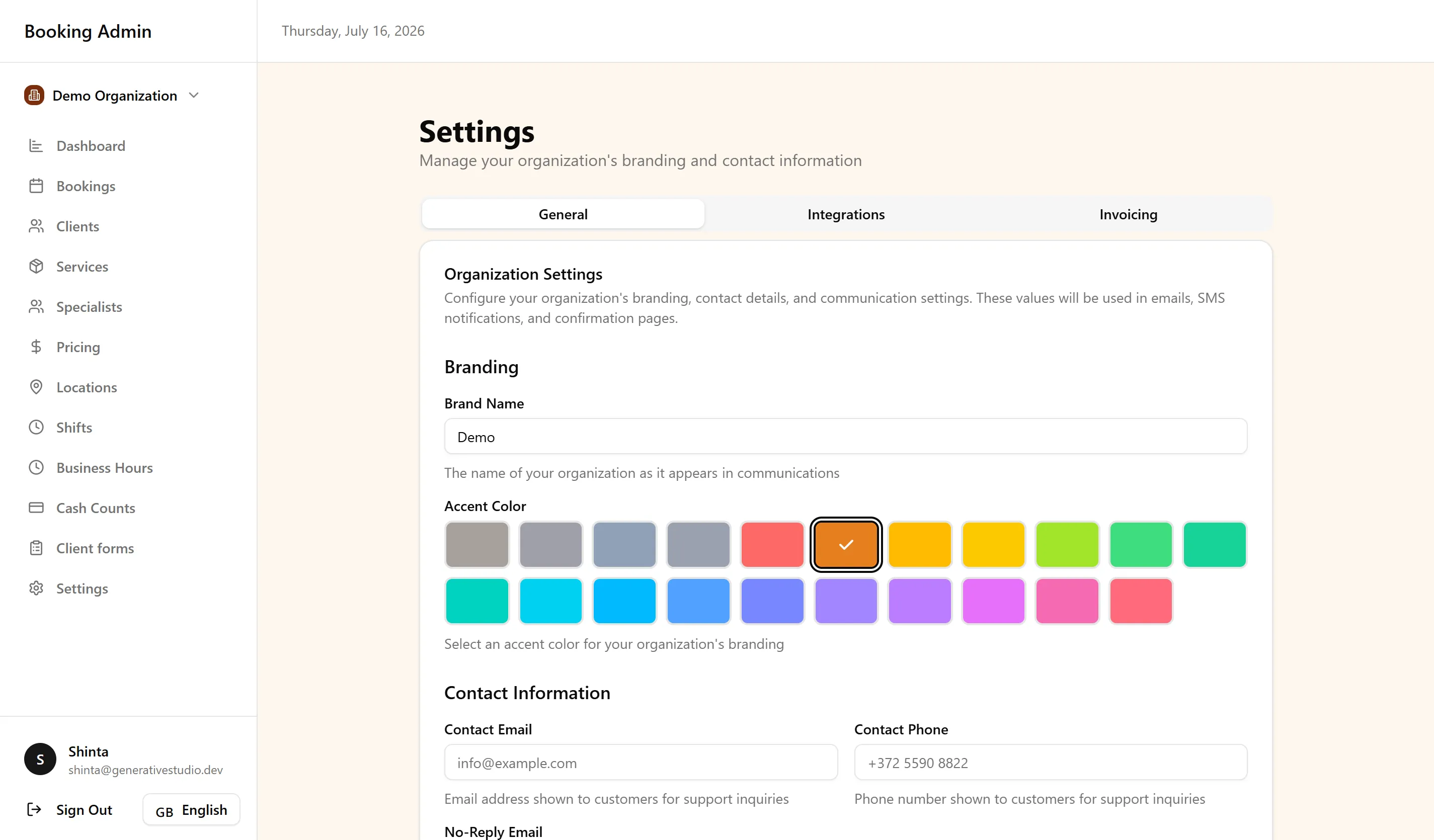
An organization represents your business within FullDay. It stores the shared configuration used throughout the platform, including:
- Business identity
- Branding
- Contact information
- SMS configuration
- Daily operations (opening and closing flows, plus optional daily meters)
- Operational defaults
These settings automatically apply wherever they are used across FullDay, ensuring a consistent experience for both staff and clients.
Under Settings → Daily operations, you can enable Opening Flow and Closing Flow independently, and add optional daily meters (a label and unit such as laser shots) that specialists record at the start and end of the day.
Locations
Section titled “Locations”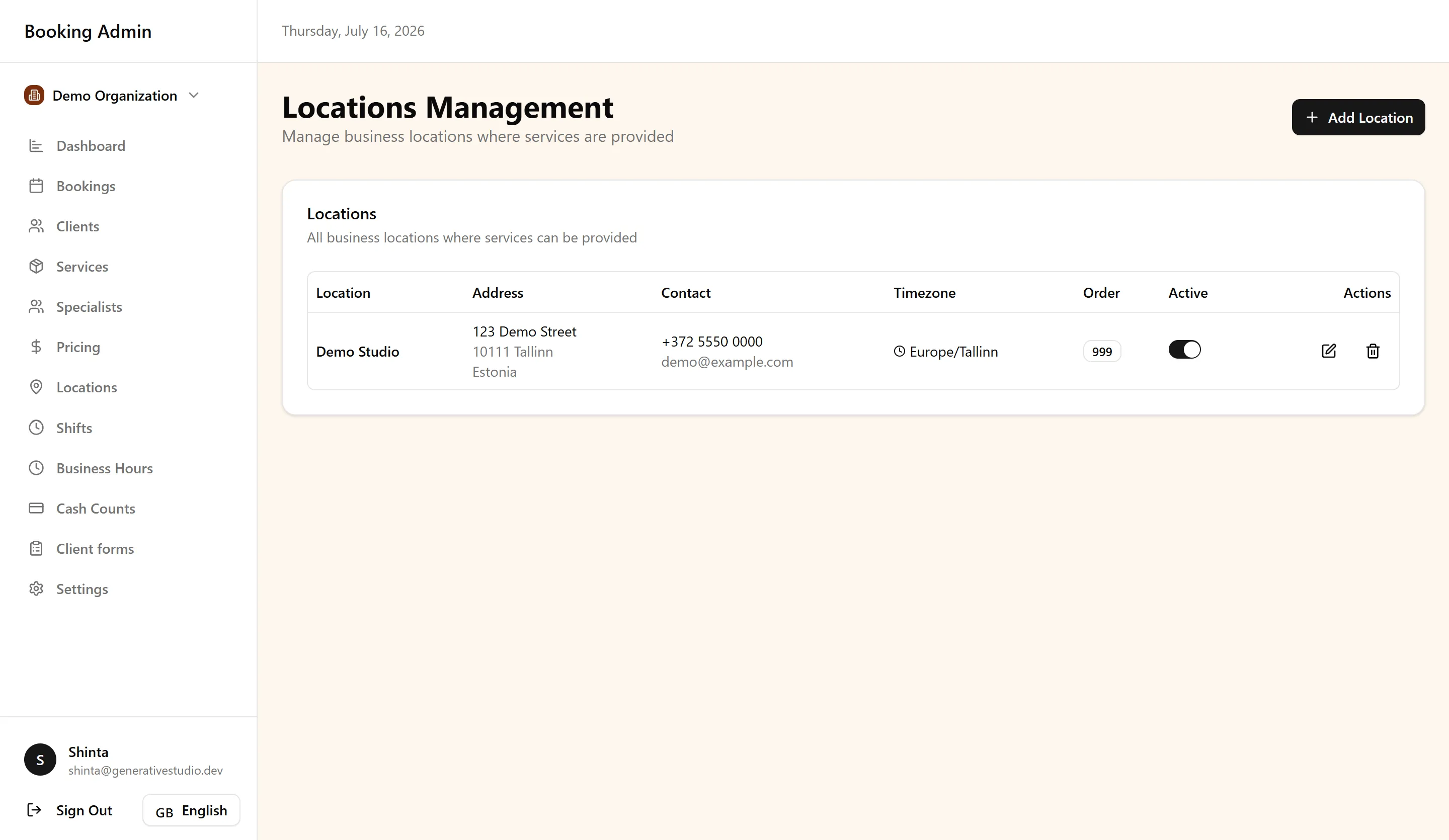
Locations represent the physical or operational places where services are delivered.
A business may operate:
- a single clinic
- multiple salons
- several offices
- multiple branches across different cities
Each location operates independently while remaining part of the same organization.
Locations provide their own operational context, including scheduling, pricing, and availability, allowing one organization to manage multiple sites from a single system.
Multi-location support
Section titled “Multi-location support”Each location maintains its own business hours, specialists, pricing, and availability while remaining part of the same organization.
Bookings always use the configuration of the selected location.
Timezone management
Section titled “Timezone management”Each location operates in its own timezone. FullDay automatically normalizes time across the platform so clients and staff always see appointments in the correct local context.
How locations affect scheduling
Section titled “How locations affect scheduling”Locations are one layer of FullDay’s scheduling engine. Availability is calculated using the selected location together with services, specialists, business hours, and scheduling rules.
For more information about how scheduling decisions are calculated, see Services, Specialists & Scheduling.
Location-specific pricing
Section titled “Location-specific pricing”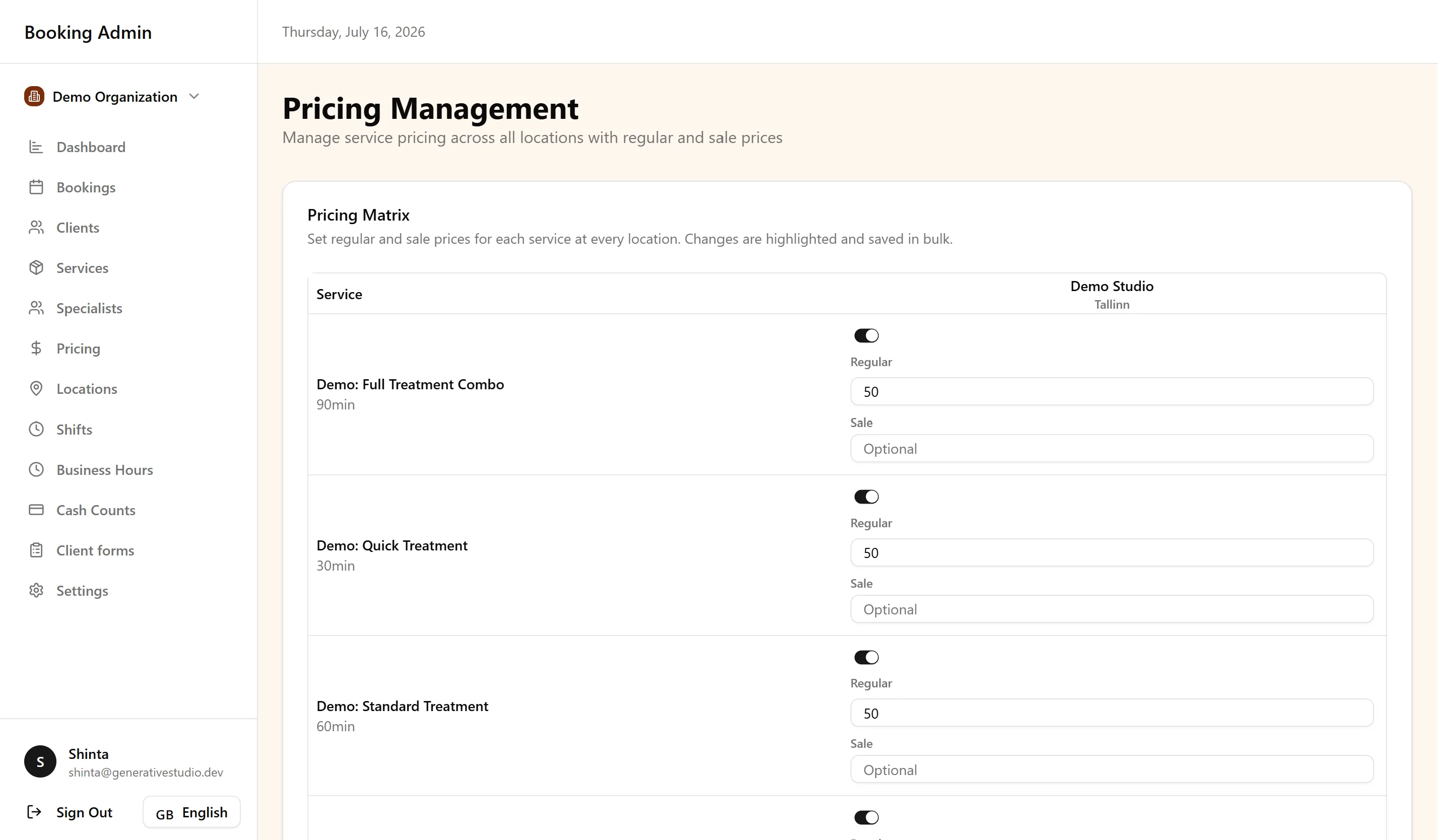
The same service can have different pricing at different locations.
This allows organizations to support:
- regional pricing
- premium locations
- promotional pricing by site
Pricing shown during booking always reflects the selected location, ensuring clients see the correct rate before confirming an appointment.
Business hours by location
Section titled “Business hours by location”Business hours define when each location accepts bookings.
Every location maintains its own operating schedule.
Business hours work together with specialist shifts and scheduling rules to determine when appointments can be offered.
If a location is closed, appointments cannot be booked there regardless of specialist availability.
Deleting a business hour asks for confirmation first. The action is permanent and cannot be undone.
Organization-wide communication settings
Section titled “Organization-wide communication settings”SMS sender name, OTP country prefixes, and appointment reminder switches are configured at the organization level under Settings → General. SMS and email appointment reminders sit together under Appointment Reminders.
Once configured, they apply across every location:
- SMS sender name is the name clients see on text messages (up to 11 characters).
- OTP country prefixes control which phone-number prefixes can receive booking verification SMS.
- Appointment reminder SMS sends a text on the next hourly check after the visit is within 48 hours (location timezone).
- Appointment reminder email sends an email on the next hourly check after the visit is within 24 hours (location timezone).
If you turn a reminder on after that window has already opened, the next hourly check sends it. Each booking gets at most one SMS reminder and one email reminder.
You can optionally replace the default reminder wording on the same page, per language (English, Estonian, Russian, Finnish). Leave a language empty to keep that language’s default. For online bookings, clients receive the version matching the language used on the booking page. For bookings created by staff, reminders use the language saved on the client profile. The language tab you edit controls that version’s wording, it does not change a client’s reminder language.
SMS placeholders are {brandName}, {dateTime}, {reference}, and {contactPhone}. The email reminder paragraph uses {brandName}.
Cart abandonment emails and post-appointment review emails have their own switches on the same page.
Booking confirmation emails still go out when a booking is created (staff can skip them on an individual admin booking). Phone verification SMS is separate from appointment reminders.
This keeps customer communication consistent while reducing administrative maintenance.
How organization settings affect the platform
Section titled “How organization settings affect the platform”Organization settings automatically power both the Booking Portal and Booking Management.
Clients see the correct branding, pricing, locations, and availability, while your team works with the same configuration when managing bookings.
How everything connects
Section titled “How everything connects”Organization settings provide the foundation for every booking.
The relationship can be viewed as:
Organization → Location → Services → Specialists → Business Hours & Scheduling Rules → Availability → Bookings
Each layer builds on the one before it.
Keeping the organization structure accurate ensures that every booking is created using the correct business rules.
Best practices
Section titled “Best practices”A few habits help keep your organization configuration reliable as your business grows:
- Configure locations before accepting bookings.
- Keep business hours and pricing up to date.
- Use separate locations for real operational sites.
- Remember that organization settings affect the entire platform.
Next steps
Section titled “Next steps”Continue building your operational setup with these guides:
-
Guided Onboarding — Finish the first location, hours, and business details in the setup wizard.
-
Services, Specialists & Scheduling — Configure the scheduling engine that powers every location.
-
Booking Portal — See how organization settings appear to clients during booking.
-
Booking Management — Manage appointments that use the same shared organization configuration.
-
Opening Flow: Enable daily opening checks, configure salon conditions and daily meters, and review location-specific opening reports.
-
Closing Flow: Enable daily closing checks, configure closing conditions and daily meters, and review location-specific closing reports.
-
Company Handbook: Enable the staff handbook and add emergency contacts and scenario instructions.
-
Emergency Cancellation: Enable specialists to cancel upcoming bookings and notify customers by SMS and email.
-
Clients — Understand how bookings and client records are connected across your organization.
-
Billing & Subscriptions — See how SMS spend is billed and how the monthly plan price acts as a spend cap.
For common questions about organizations, locations, and scheduling configuration, see the FAQ.